
Training Qwen3 Reranker with ms-swift
June 23, 2026 · Discover
End-to-end practical tutorial for fine-tuning Qwen3-Reranker-0.6B on custom MTEB-style retrieval data using ms-swift generative_reranker task, pointwise vs listwise loss, LoRA rank experiments, 3-epoch "train longer" runs, custom holdout evaluation (MRR, Success@K, NDCG, avg rank), and measured gains from each change.
Training Qwen3 Reranker with ms-swift
This guide walks through fine-tuning Qwen3-Reranker (0.6B) for a custom reranking task using ms-swift. It covers data conversion from raw MTEB format, environment setup on a remote GPU server, pointwise then listwise training, LoRA rank 8→16, 1-epoch vs 3-epoch ("train longer") runs, a custom evaluation script for MRR/Success@K/NDCG/avg-rank, matplotlib charts of the actual training dynamics, and downloading the final LoRA adapter.
We started from stock baseline MRR 0.782 / Success@1 0.667 on a 150-example holdout and reached 0.879 MRR / 0.807 Success@1 after listwise + r=16 + 3 epochs — a substantial, reproducible lift.
Related: see the companion Deploying Qwen3 Reranker with vLLM for serving the fine-tuned adapter.
Table of contents
- Overview
- Surprising Usages of Reranker Models (and Why Fine-tuning Matters)
- Prerequisites
- Hardware and remote server notes
- Data preparation (MTEB → SWIFT messages)
- Environment setup (ms-swift + venv)
- The custom evaluator
- Baseline evaluation
- Training experiments
- Training dynamics (charts)
- Metric improvements
- Choosing & downloading the final adapter
- Using the trained LoRA
- Full launch script example
- Troubleshooting
- Quick reference
- Further reading
Overview
| Component | Choice |
|---|---|
| Base model | Qwen/Qwen3-Reranker-0.6B (also 4B/8B available) |
| Framework | ms-swift sft with --task_type generative_reranker |
| Loss types | pointwise_reranker then listwise_reranker (with LISTWISE_RERANKER_TEMPERATURE=0.5) |
| PEFT | LoRA, target_modules all-linear, r=8 then r=16 / alpha=64 |
| Data format | SWIFT messages: {"messages": [...user...], "positive_messages": [[...]], "negative_messages": [...]} |
| Training | num_train_epochs=1 then =3, save_steps=20, eval_steps=10, per_device_train_batch_size=2, gradient_accumulation_steps=4 |
| Attention | sdpa (flash-attn build was slow/unstable in our env) |
| Optimizer tricks | --use_liger_kernel true |
| Eval | Custom eval_reranker.py (TransformersEngine + InferRequest score extraction) on holdout |
| Metrics | MRR, Success@1/3/5/10, NDCG@1/3/5/10, Avg rank of positive |
| Hardware | 1× consumer/datacenter GPU (RTX 6000 Ada / 5080 / etc.), 16–24 GB+ VRAM for 0.6B |
Recommended progression (what actually worked):
- Stock baseline.
- Pointwise r=8, 1 epoch (quick win).
- Listwise r=16, 1 epoch (#2 + #3 from our experiments).
- Listwise r=16, 3 epochs ("train longer").
Surprising Usages of Reranker Models (and Why Fine-tuning Matters)
Rerank models are usually thought of as “the last mile of retrieval-augmented generation (RAG)” — they simply re-order candidate results. In reality they support many non-obvious but extremely practical applications. The core idea is:
A reranker is fundamentally a “query × candidate matching judge.” It can rank documents, but it can also rank any set of candidates.
Here are some of the most interesting (and frequently overlooked) uses.
1. Router (replaces complex intent classifiers)
Many systems train a separate intent classifier for categories such as technical support, billing, SQL generation, casual chat, etc.
Instead, you can feed the categories as candidates:
query: 用户输入

candidates:
- technical support
- billing
- casual chat
- sql generation
The reranker simply ranks them.
Advantages
- No need to train a dedicated classifier
- New categories can be added at any time
- Strong zero-shot capability
- More robust than plain embedding cosine similarity
Example:
query: "why my docker container keeps restarting"

candidates:
- billing
- tech support
- devops
- casual chat
The reranker will naturally give the highest score to devops.
This turns a classification problem into a ranking problem — especially powerful for dynamic taxonomies.
2. Prompt / Agent selector (surprisingly powerful)
In multi-agent systems people often write brittle if-rules:
if "sql" in query:
    return sql_agent()
A much stronger approach is to describe each agent’s capability and let the reranker choose:
candidates:
- SQL expert: Good at generating and debugging complex SQL...
- Coding agent: Good at code reasoning and debugging...
- Research agent: Good at long-form web research and synthesis...
The reranker scores the user query against these capability descriptions.
It often outperforms embedding-based routing because it better understands whether the query truly matches the capability, even when the query is vague (“帮我找一下订单转化下降的原因”).
3. Prompt retrieval (more reliable than embedding)
If you maintain a library of hundreds of prompt templates (write PRD, write SQL, code review, bug analysis, legal summary, …), first do embedding recall of ~50 candidates, then rerank them with a reranker.
Rerankers are better at answering “Is this prompt really what the user needs?” than pure semantic similarity, especially for few-shot example selection from thousands of examples.
4. Structured data ranking (highly underrated)
Rerankers are not limited to plain text. You can stringify JSON objects and rank them.
Examples:
- Resume / candidate ranking for recruiting
- CRM lead scoring
- Issue / bug triage prioritization
- Product feature prioritization
Because the model understands soft semantic matches, a query like “distributed infra engineer” can correctly surface candidates mentioning Kubernetes, service mesh, and platform engineering even without exact keyword overlap.
5. SQL schema / table selection (extremely useful in production RAG)
Large schemas (hundreds of tables) cannot be stuffed into the LLM context for Text-to-SQL.
Use the reranker to rank tables (or even individual columns / join paths) given the natural-language question, then feed only the top-K relevant schema fragments. This is a key technique in many real-world Text-to-SQL systems.
6. Context compression
Inside a retrieved chunk of 1000 tokens there may be only 2–3 truly relevant sentences. Rerank the individual sentences or spans and keep only the top ones (e.g. 120 tokens). Dramatically reduces context length for long PDFs, codebases, logs, etc.
7. Code intelligence & API selection
Treat functions, classes, files, or modules as candidates. A query such as “where is auth token refresh implemented?” will surface the right code more accurately than embedding search alone.
You can even rerank available API methods for an agent:
candidates:
- createUser()
- login()
- refreshToken()
and let the reranker pick the most appropriate one for the current task.
8. Quality / safety gate (“LLM-as-judge lite”)
Use a reranker for quality filtering instead of (or in addition to) another LLM call:
- query = "best production-grade answer"
- candidates = the N responses you just generated
Rank them and pick the winner. Cheap, fast, and surprisingly effective for finding the most complete, concise, or safe reply. Also useful for self-consistency reranking (generate 8 answers → pick the best).
9. Semantic deduplication
Beyond exact-string dedup, use a reranker to remove near-duplicate meaning:
query: "unique viewpoints"
candidates: many similar search results or feed items
Keep only the most diverse high-quality ones. Valuable for search, recommendation, and feed ranking.
10. Database modeling & schema hypothesis ranking
When reverse-engineering a data model from sample data or workload, generate multiple candidate relationship hypotheses and let the reranker score them against the observed queries and data characteristics. Combines well with program-synthesis approaches.
Rule of thumb
Whenever you have “pick the best candidate out of many”, consider a reranker.
The candidates do not have to be documents. They can be prompts, tools, APIs, agents, database schemas, SQL fragments, config options, code snippets, UI actions, or even next-step decisions in an agent plan.
For many of the uses above — especially when the candidates belong to a custom, domain-specific taxonomy (product categories, internal knowledge base sections, code modules, database tables, etc.) — the stock general-purpose reranker is usually insufficient. It was trained on broad web data and does not know your exact definition of “relevant.”
Fine-tuning on your own query–candidate pairs teaches the model the precise matching criteria that matter for your application. The rest of this tutorial shows exactly how to do that with ms-swift on a real custom reranking dataset.
Prerequisites
- Linux GPU server (any cloud or on-prem box with NVIDIA GPU accessible via SSH).
- NVIDIA GPU + recent driver (
nvidia-smiworks). - Python 3.12 +
uvorvenv. - Hugging Face / ModelScope access for base model (or pre-cached in
HF_HOME). git,rsync/scpfor moving data and final adapters.- ~10–20 GB free disk (models + checkpoints + optimizer states during training).
On the server we often set:
export HF_HOME=/path/to/hf_cache
export CUDA_VISIBLE_DEVICES=0
export NPROC_PER_NODE=1
Hardware and remote server notes
A typical single-GPU server (e.g. RTX 6000 Ada / A6000 / 5080 class or equivalent cloud instance) is plenty for the 0.6B model with LoRA. The 4B model is also feasible but slower and more memory-hungry when using listwise loss (because each example carries more negative candidates).
Disk warning: Many GPU instances have small root disks (e.g. 32 GB). Training writes optimizer states plus multiple checkpoints. Keep save_total_limit modest (5 is a good default) and clean old experiment directories regularly. For longer projects, use a volume-backed instance.
Data preparation (MTEB → SWIFT messages)
Our raw data lives in MTEB reranker format (one line per example):
{"query": "...", "positive": ["..."], "negative": ["...", ...], ...}
ms-swift's generative_reranker expects the chat-style messages format with explicit positive_messages / negative_messages lists of assistant turns.
Here's a typical converter (run after copying your raw data to the training server):
import json

def to_swift_reranker(raw_path, out_path):
    out = []
    with open(raw_path) as f:
        for line in f:
            if not line.strip(): continue
            ex = json.loads(line)
            q = ex["query"].strip()
            pos = [p.strip() for p in ex.get("positive", [])]
            neg = [n.strip() for n in ex.get("negative", [])]

            out.append({
                "messages": [{"role": "user", "content": q}],
                "positive_messages": [[{"role": "assistant", "content": p}] for p in pos],
                "negative_messages": [[{"role": "assistant", "content": n}] for n in neg],
            })

    with open(out_path, "w") as f:
        for o in out:
            f.write(json.dumps(o, ensure_ascii=False) + "\n")
    print(f"Wrote {len(out)} examples -> {out_path}")

# Usage after copying raw data to server
to_swift_reranker("/path/to/raw/train.jsonl", "/path/to/swift/train.jsonl")
to_swift_reranker("/path/to/raw/eval.jsonl", "/path/to/swift/eval.jsonl")
Counts in our final run: 604 train / 150 eval.
Keep the raw data directory around for reproducibility and for the custom evaluator (which also understands the simple format).
Environment setup (ms-swift + venv)
On the server (inside the target venv):
source /path/to/venv/bin/activate
pip install -U "ms-swift[all]"
# or uv pip install ...
For listwise we also used:
export LISTWISE_RERANKER_TEMPERATURE=0.5
Install the base model once (or let it lazy download):
# Will be cached under $HF_HOME
python -c "
from swift.llm import get_model_tokenizer
get_model_tokenizer('Qwen/Qwen3-Reranker-0.6B', load_model=False)
"
We often used --use_hf true together with a pre-cached local path to avoid repeated Hub calls during experiments:
--model /path/to/cached/Qwen3-Reranker-0.6B --use_hf true
Attention backend note: We had repeated flash-attn build pain (slow, hung on cicc/ptxas). We settled on --attn_impl sdpa which was reliable and fast enough.
The custom evaluator
Swift's internal eval_mrr during training is useful for monitoring but we wanted apples-to-apples numbers on a fixed holdout using the exact same scoring logic we would use at inference time.
We created a small eval_reranker.py script (key excerpts):
from swift.infer_engine import TransformersEngine, InferRequest

def get_relevance_score(engine, query, doc):
    request = InferRequest(
        messages=[
            {"role": "user", "content": query},
            {"role": "assistant", "content": doc},
        ]
    )
    responses = engine.infer([request])
    # ... parse resp.choices[0].message.content[0] as float
    ...

def compute_metrics(ranks):
    # MRR, Success@K, NDCG@K, avg_rank
    ...
Usage:
python eval_reranker.py \
  --model 0.6B \
  --adapters /path/to/checkpoint-228 \
  --data /path/to/swift/eval.jsonl \
  --save_json /tmp/eval_ckpt228.json
This script was run on every new checkpoint before save_total_limit could delete it.
Baseline evaluation
python eval_reranker.py --model 0.6B --data /path/to/swift/eval.jsonl
Stock 0.6B on our 150 holdout:
MRR: 0.7824 | Success@1: 0.6667 | NDCG@1: 0.6667 | Avg rank: 1.86
Training experiments
We iterated with clear run names for the progression:
- pointwise r=8, 1 epoch
- listwise r=16, 1 epoch (best ~step 40)
- listwise r=16, 3 epochs (final at 228)
Core flags (listwise 3ep version):
swift sft \
  --model .../Qwen3-Reranker-0.6B --use_hf true \
  --task_type generative_reranker \
  --loss_type listwise_reranker \
  --tuner_type lora --lora_rank 16 --lora_alpha 64 \
  --learning_rate 5e-5 --target_modules all-linear \
  --dataset /path/to/swift/train.jsonl \
  --val_dataset /path/to/swift/eval.jsonl \
  --attn_impl sdpa --torch_dtype bfloat16 \
  --use_liger_kernel true \
  --num_train_epochs 3 \
  --per_device_train_batch_size 2 --gradient_accumulation_steps 4 \
  --max_length 2048 \
  --save_steps 20 --save_total_limit 5 \
  --eval_strategy steps --eval_steps 10 \
  --logging_steps 5 \
  --output_dir /path/to/output/my-reranker-run
Launched in background safely:
source /path/to/venv/bin/activate
export LISTWISE_RERANKER_TEMPERATURE=0.5
nohup bash -c 'swift sft ...' > /path/to/output/train.log 2>&1 &
(We often wrote the full command to a temp script on the remote first to avoid shell quoting disasters over SSH.)
Training dynamics (charts)
Here are the actual curves from the 3-epoch listwise r=16 run.
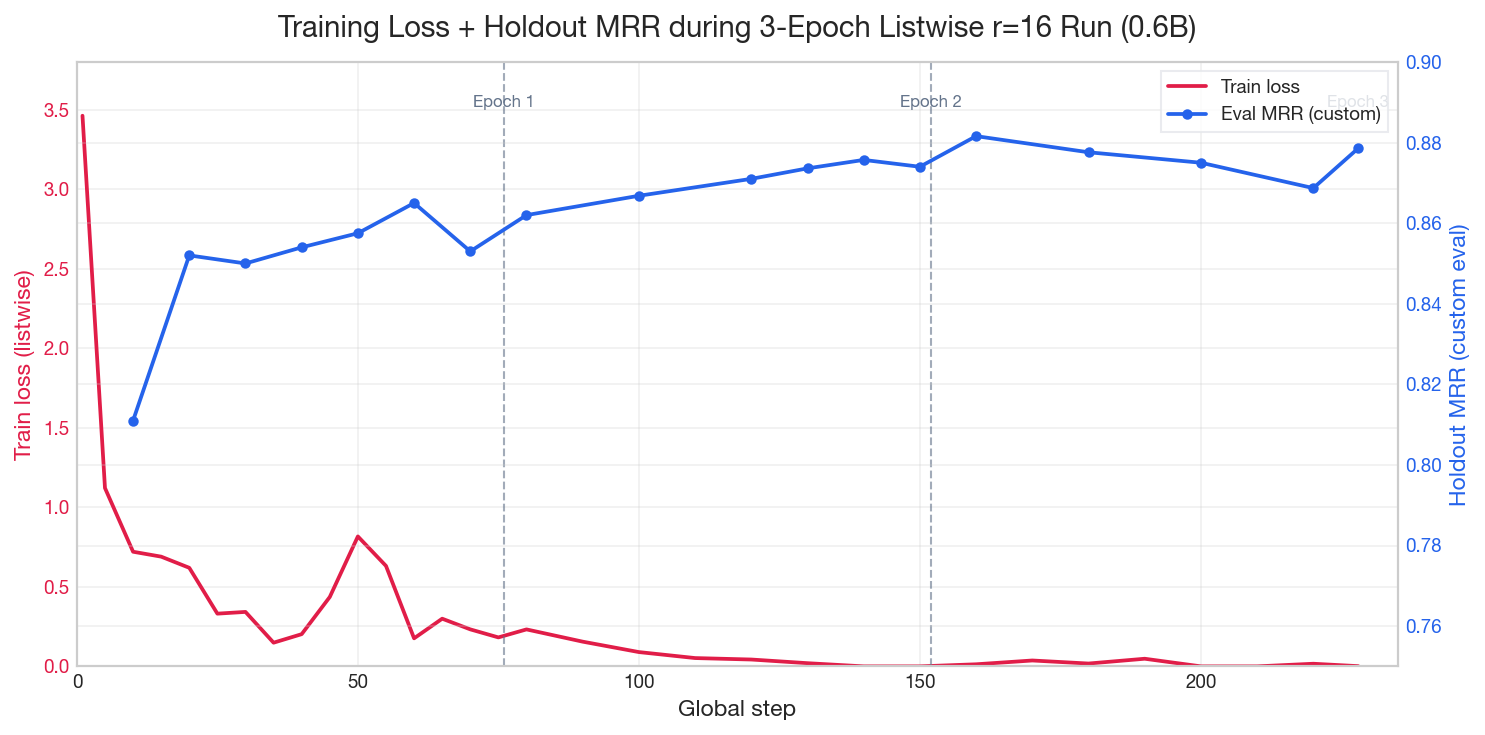
Note the rapid early drop in loss, the continued MRR climb well into epoch 2–3, and the epoch boundaries.
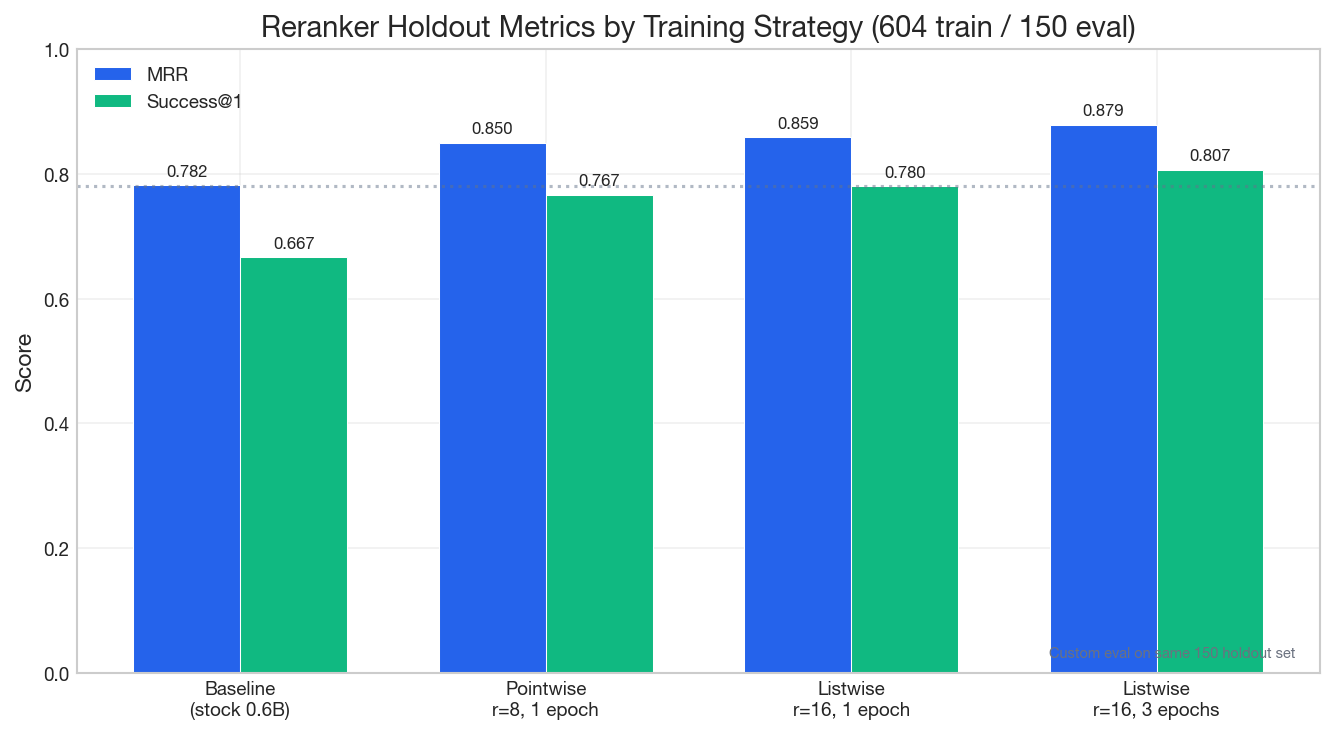
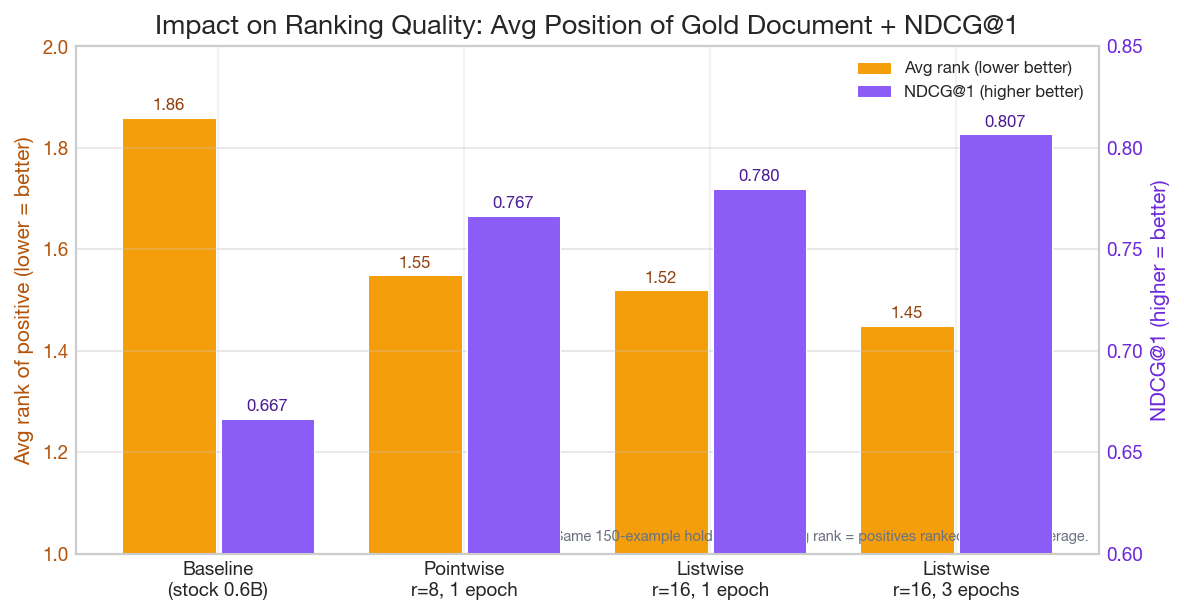
Each change (listwise, higher rank, more epochs) moved the needle. The biggest single jump often came from switching to listwise + r=16; the "train longer" step gave another clean ~0.02 MRR / ~0.027 Success@1.
Metric improvements
| Run | MRR | Success@1 | NDCG@1 | Avg rank | Notes |
|---|---|---|---|---|---|
| Stock baseline | 0.7824 | 0.6667 | 0.6667 | 1.86 | — |
| Pointwise r=8 1ep | 0.8499 | 0.7667 | 0.7667 | 1.55 | Quick first fine-tune |
| Listwise r=16 1ep (best) | 0.8586 | 0.7800 | 0.7800 | 1.52 | Best ckpt ~40 |
| Listwise r=16 3ep (final) | 0.8786 | 0.8067 | 0.8067 | 1.45 | final checkpoint (also near-identical results at epoch-2 checkpoint) |
Swift's internal "best" checkpoint was often an earlier one; our custom holdout script reliably preferred later checkpoints in the longer run.
Choosing & downloading the final adapter
After training finishes:
# On the remote machine
ls /path/to/output/my-reranker-run/.../checkpoint-228/
# adapter_config.json  adapter_model.safetensors  args.json  README.md ...
Download only the inference-useful files (skip the large optimizer/rng/scheduler state files):
# From your laptop
mkdir -p adapters/qwen3-reranker-0.6b-finetuned
scp user@your-gpu-server:/path/to/output/.../checkpoint-228/adapter_config.json adapters/qwen3-reranker-0.6b-finetuned/
scp user@your-gpu-server:/path/to/output/.../checkpoint-228/adapter_model.safetensors adapters/qwen3-reranker-0.6b-finetuned/
scp user@your-gpu-server:/path/to/output/.../checkpoint-228/{args.json,README.md,trainer_state.json,training_args.bin,additional_config.json} adapters/qwen3-reranker-0.6b-finetuned/
A typical resulting local directory:
adapters/qwen3-reranker-0.6b-finetuned/
├── adapter_config.json
├── adapter_model.safetensors
├── args.json
├── README.md
├── additional_config.json
├── trainer_state.json
└── training_args.bin
Using the trained LoRA
With the same eval_reranker.py:
python eval_reranker.py \
  --model 0.6B \
  --adapters adapters/qwen3-reranker-0.6b-finetuned \
  --data /path/to/swift/eval.jsonl
Or load in your own inference code via PeftModel + the original Qwen3-Reranker base, or pass the adapter dir to swift infer / vLLM (after appropriate conversion if needed for vLLM classify mode).
Full launch script example
We usually wrote the exact training command to a small shell script (e.g. /tmp/run_reranker.sh) on the remote machine first (this avoids painful quoting issues over SSH):
#!/bin/bash
set -euo pipefail
source /path/to/venv/bin/activate
export LISTWISE_RERANKER_TEMPERATURE=0.5
export HF_HOME=/path/to/hf_cache

swift sft \
  --model /path/to/cached/Qwen3-Reranker-0.6B --use_hf true \
  --task_type generative_reranker \
  --loss_type listwise_reranker \
  --tuner_type lora --lora_rank 16 --lora_alpha 64 \
  --learning_rate 5e-5 --target_modules all-linear \
  --dataset /path/to/swift/train.jsonl --val_dataset /path/to/swift/eval.jsonl \
  --attn_impl sdpa --torch_dtype bfloat16 --load_from_cache_file true \
  --split_dataset_ratio 0.0 \
  --eval_strategy steps --eval_steps 10 \
  --output_dir /path/to/output/my-reranker-run \
  --save_steps 20 --save_total_limit 5 \
  --logging_steps 5 --num_train_epochs 3 \
  --max_length 2048 --per_device_train_batch_size 2 \
  --gradient_accumulation_steps 4 --dataset_num_proc 4 \
  --use_liger_kernel true
Then launch it in the background:
nohup bash /tmp/run_reranker.sh > /path/to/output/train.log 2>&1 &
Troubleshooting
"padding_free requires flash_attn" — remove the flag (or install flash-attn properly). We used sdpa successfully.
Quoting / heredoc hell over SSH — write complex commands to /tmp/xxx.sh or /tmp/xxx.py on the remote first (via cat << 'PYEOF' | ssh ... 'cat > /tmp/xxx.py' or scp), then execute the file.
Old checkpoints disappearing — save_total_limit=5 + high save_steps frequency. Eval promptly after each save or lower the limit / raise save interval.
Swift "best" ckpt != your custom best — always run the holdout evaluator. Internal eval during training uses the val split provided to the trainer and may differ in formatting or scoring.
Data count mismatch after update — re-copy your raw data directory, re-run the SWIFT converter, and double-check wc -l.
Slow / hung flash-attn build — kill it, fall back to sdpa, or build on a beefier box first.
Disk full mid-run — df -h / regularly. rm -rf old output trees (but keep the final adapter dirs you care about).
Quick reference
# 1. Copy data + convert
scp -r ./raw-data user@your-gpu-server:/path/to/raw
# run the to_swift_reranker converter on the server

# 2. Launch (example)
export LISTWISE_RERANKER_TEMPERATURE=0.5
nohup swift sft --task_type generative_reranker --loss_type listwise_reranker \
  --lora_rank 16 ... --num_train_epochs 3 ... &

# 3. Watch
tail -f /path/to/output/train.log
# When a new checkpoint appears:
python eval_reranker.py --adapters .../checkpoint-NN --data /path/to/swift/eval.jsonl --save_json /tmp/eval-NN.json

# 4. Download final adapter
scp user@your-gpu-server:/path/to/output/.../checkpoint-228/adapter_config.json adapters/my-reranker/
scp user@your-gpu-server:/path/to/output/.../checkpoint-228/adapter_model.safetensors adapters/my-reranker/
Further reading
- ms-swift Reranker Best Practices: https://swift.readthedocs.io/en/latest/BestPractices/Reranker.html
- Deploying Qwen3 Reranker with vLLM
- Qwen3-Reranker model cards on HF / ModelScope
- The accompanying training scripts and custom evaluator (see the linked repo with the article)
Results are reproducible if you use the exact same 604/150 split, the same converter, and the launch flags above. The charts above were generated directly from the run logs + custom eval JSONs using matplotlib.
Train longer (and listwise + higher rank) really does help.